
Kea Labs Search Pro for WooCommerce · FAQ
WordPress and WooCommerce search questions
Find the answer you need
Start with the plugin and trial, then review the license, search features, WordPress setup, and merchant tools.
Choosing and buying Kea Labs Search Pro

Running search in your store
 Search and product filters
Autocomplete, relevance, synonyms, and catalog attributes.
Merchandising and analytics
Product priorities, Preview, and search reports.
 WordPress setup and operation
Your theme, catalog updates, languages, and hosting.
 AI assistance and Kea Labs Cloud
Configuration help and choosing the right product.
Product and trial
What does Kea Labs Search Pro add to WooCommerce?
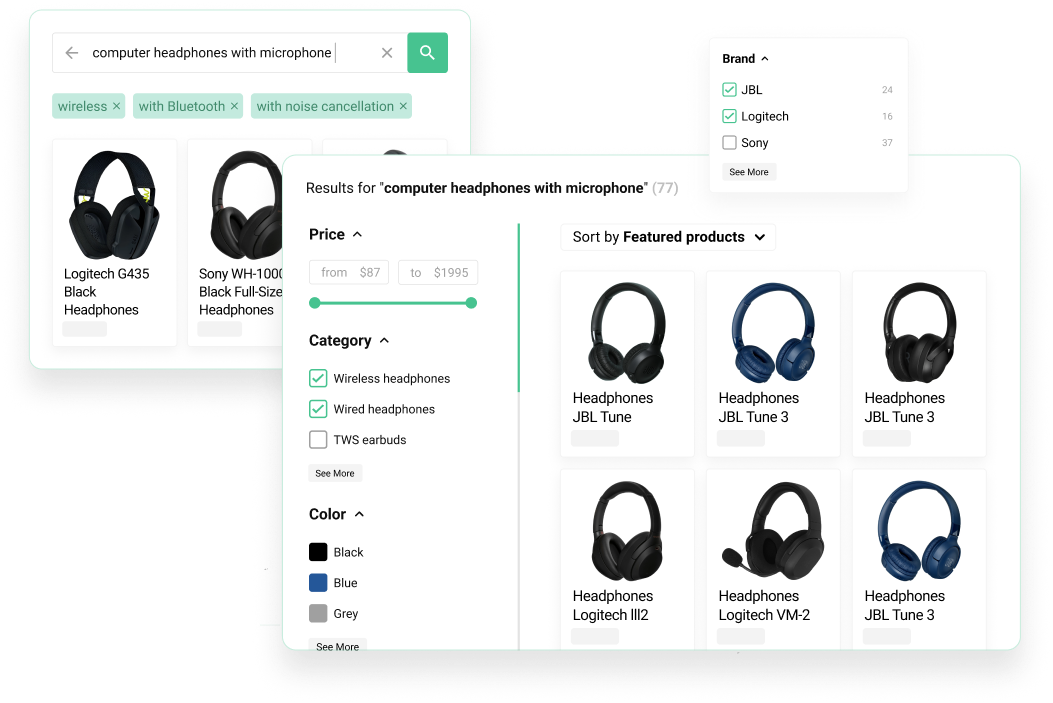
Kea Labs Search Pro is a WordPress plugin for WooCommerce product search. It includes autocomplete, product results, filters, configurable relevance, synonyms, typo handling, merchandising, customization, analytics and AI-assisted setup. Its search engine and catalog index run in your store.
Is Kea Labs Search Pro just a connector to Kea Labs Cloud?
No. Kea Labs Search Pro is a WordPress plugin for WooCommerce product search. Its search engine and catalog index run in your store, with relevance, filters, merchandising, and analytics managed in WordPress. It provides automatic real-time catalog updates. Kea Labs Cloud is a separate managed service.
How can I try Kea Labs Search Pro for WooCommerce?
A 14-day trial is available through the Kea Labs marketplace. Use your own WooCommerce products, theme and customer searches. Start 14-day trial. Download the plugin, install it in WordPress and open Kea Search to configure your catalog and preview the results. Contact our team if you need configuration help or more time.
Can I extend the 14-day trial?
Yes. Contact Kea Labs if you need more time to finish evaluating your catalog, WordPress theme, or search settings. We can extend the 14-day trial so your team can complete those checks.
Which searches should I check?
Choose a short list of important searches: an exact name or SKU, a broad product type, a common typo, and a customer term that differs from your catalog wording. Write down the products you expect near the top and the filters that help shoppers choose. Keep the current results as a baseline, include desktop and mobile, and assign someone to review relevance and one merchandising change.
Does sending an enquiry start my 14-day trial?
No. An enquiry asks Kea Labs for help with your store. To evaluate the plugin, Start 14-day trial.
Which search and merchant tools can I explore?
Kea Labs Search Pro includes autocomplete, product results, filters, configurable relevance, merchandising, and search analytics in the WooCommerce plugin. The feature guide explains each area. Use the Start 14-day trial to evaluate them with your products and WordPress theme.
Kea license, trial, and Care
One production store, unlimited development and test stores, and optional Care.
How much does Kea Labs Search Pro for WooCommerce cost?
Kea Labs Search Pro is a one-time plugin purchase at €350 through the Kea Labs marketplace, with no monthly search subscription. The license covers one production store and unlimited development and test stores.
How many stores does one license cover?
One license covers one production store, plus unlimited development and test stores. Use those environments to configure search, check your theme, and review changes before publishing to your production store.
What does Care include, and how much does it cost?
Care is an optional subscription. The first year is included free with the plugin purchase. After that year, an active Care subscription at €160 per year is required to receive updates, new functionality, and support.
Is Care required to keep using the purchased plugin?
Care is optional. Your plugin license and Care are separate: an active Care subscription is required for updates, new functionality, and support after the first included year. You can continue using the purchased plugin without renewing Care.
How can I pay?
Pay by card through Stripe.
Is my plugin purchase credited if I move to Kea Labs Cloud?
Yes. When you migrate to Kea Labs Cloud, the amount paid for the plugin is credited toward the Cloud service. Contact our team to discuss the migration.
Can I transfer my license to another domain?
Yes. Open your account, select the purchased plugin, and transfer its license to the new domain. One license covers one production store.
Can someone help me configure and customize Kea Labs Search Pro?
Yes. Kea Labs or a partner can help with configuration and customization. Contact our team with your store URL, theme, catalog, and search goals so we can help you arrange the work.
Search and product discovery
Does Kea Labs Search Pro require Elasticsearch?
No. Its SQL-backed search engine and catalog index run inside your WooCommerce store. No separate Elasticsearch server or hosted search service is required.
Can it handle typos and synonyms?
Yes. The relevance engine includes typo tolerance, fuzzy matching, text analysis, and configurable synonyms alongside BM25 scoring and weighted product fields. Explore search relevance.
Does it support autocomplete and full search results?
Yes. Choose a rich search widget, a classic results page, or both. Ranking, filters, and merchandising remain connected across the supported layouts.
What filters can a merchant configure?
Lists, numeric ranges, color swatches, and Boolean toggles are available for supported catalog data. Merchants control labels, visibility, order, and value mapping. Explore product filters.
Can I use product data such as attributes or SKU in search?
Yes, where those fields are supported and included in the searchable catalog. Check representative products and the values shoppers use to identify them, such as a name, SKU, brand, or attribute. Tune supported field priorities, then verify exact references and broader searches against the expected products. Including a field does not by itself determine its ranking.
How can I compare relevance with my current search?
Run the same shortlist of customer queries against the current search and Kea Labs Search Pro. Record which products appear first, whether a known item is easy to find, and whether filters help with broader queries. Change one relevance setting or merchandising rule at a time and compare the results in Preview. This makes it easier to judge the effect of each change rather than relying on one impressive example.
Merchant control and reporting
Can I promote specific products for important searches?
Yes. Use exact-query rules, product rules, and category priorities to pin, boost, bury, or hide products within the applicable search context. Explore search merchandising.
Can I review merchandising before activation?
Yes. Compare natural and adjusted results, inspect which rule caused a change, and keep drafts inactive until the team decides to activate them.
Which analytics reports are available?
Kea Labs Search Pro provides Top Queries, Zero Results, Lost Opportunities, Popular Products, and a dashboard of search and click activity for the selected reporting period. Explore search analytics.
Are search clicks the same as revenue attribution?
No. These reports describe search activity and click events. They do not by themselves establish sessions, completed purchases, attributed revenue, or a guaranteed conversion improvement.
Configuration and operation
What should I check with my WordPress theme?
Check your header and mobile search entry points, product cards, filters and responsive layout in Preview. Kea Labs Search Pro provides visual layout settings, product-card controls, CSS and custom templates for theme adaptation. Explore interface customization.
How is the catalog connected to search?
The plugin builds its search index from WooCommerce product data and updates the catalog automatically in real time when products change. Reindex controls are also available. Check representative products, searchable fields, and filters during evaluation, then review the storefront in Preview before publishing.
What hosting does Kea Labs Search Pro use?
Search and indexing use your store’s application and database resources. Plan capacity around your catalog, filters, product updates and expected traffic. Use the WooCommerce performance planning guide.
Can an agency configure and maintain it?
Yes. Agencies can deliver search setup, relevance tuning, merchandising, filters, theme adaptation, launch review, client handover, and later improvements guided by analytics.
How should I evaluate searches in my catalog languages?
Use customer queries for each catalog language, including accents, word forms, synonyms and exact product references. Compare those queries with your indexed product data. Share your language setup with Kea Labs so the trial covers the search behavior your store needs.
Can our team review changes before shoppers see them?
Yes. Use Preview to inspect the proposed search interface and results before publication. Review representative queries, filters, product cards, and merchandising effects, then have the responsible person approve activation. AI-assisted setup also leaves the review and publication decision with your team; preparing a configuration is a separate step from making it public.
AI assistance and product choice
What does AI-assisted setup do?
Connect your AI client through Kea Labs Search Pro’s MCP tools and use the setup or maintenance skill to inspect store context and prepare search, merchandising and storefront settings. Review the result in Preview before enabling it. Explore AI-assisted setup.
Do I bring my own AI account?
Yes. Use your own supported AI client and model account. Model access and usage are separate from the search plugin.
Does Kea Labs Search Pro provide semantic or image search?
No. Kea Labs Search Pro uses catalog-based relevance, text analysis, synonyms, typo handling, filters and merchandising. Semantic search, image search and recommendations are separate capabilities available through Kea Labs Cloud.
How is Kea Labs Search Pro different from Kea Labs Cloud?
Kea Labs Search Pro is the WordPress plugin: its search engine and catalog index run in your store environment, and your team manages relevance, filters, and merchandising there. Kea Labs Cloud is a separate managed service for needs such as semantic search, image search, recommendations, and provider-operated infrastructure. AI-assisted configuration in Kea Labs Search Pro helps set up the native search; it does not turn the plugin into the Cloud service.