
WooCommerce search relevance
Match WooCommerce searches to the right products

Search beyond the exact product name
Field priorities, BM25 scoring, language processing, synonyms, and typo tolerance work together to connect shopper intent with your WooCommerce catalog.
Query handling
Useful results from imperfect queries
Shoppers do not need to type the exact words stored in the catalog.
Typos and fuzzy matches
A misspelling such as “sneker” can still find products indexed as “sneaker”.
Word forms and variants
Analyzers connect useful forms of a word instead of requiring one exact spelling.

Partial terms and product codes
Match useful fragments and exact references such as SKU, EAN, UPC, or vendor codes.
Store-specific synonyms
Connect the terms shoppers use with the words used in the catalog.
Ranking model
How the ranking engine works
The engine analyzes WooCommerce product data, turns it into searchable terms, scores matches, and orders the results inside your store.
Text processing
Text analysis and tokenization
Language-aware processors normalize product text and turn it into searchable terms.
Catalog signals
Weighted product fields
Give product name, brand, category, reference, attributes, and features different influence.

Relevance score
BM25 relevance scoring
Stronger matches receive higher scores and rise above incidental mentions.
Fresh store data
Current catalog context
Product updates keep price, stock, and availability connected to the results; reindex controls rebuild the catalog when needed.
Inside Kea Labs Search Pro
See the controls behind relevant results
Choose which product details can match a query, set their influence, and connect customer vocabulary to the catalog.
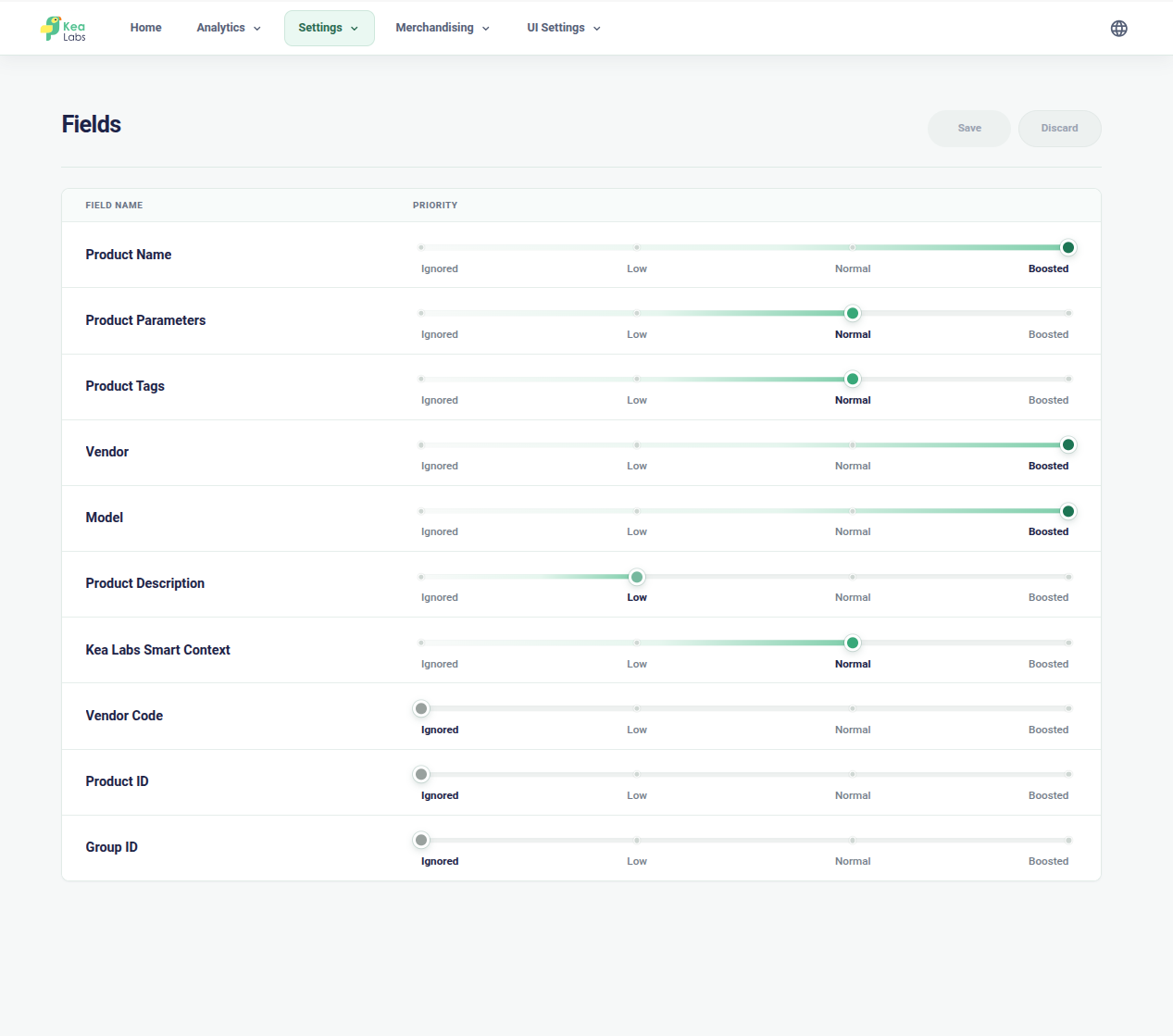
Choose searchable product details
Use product names, references, categories, and supported attributes with deliberate relevance priorities.
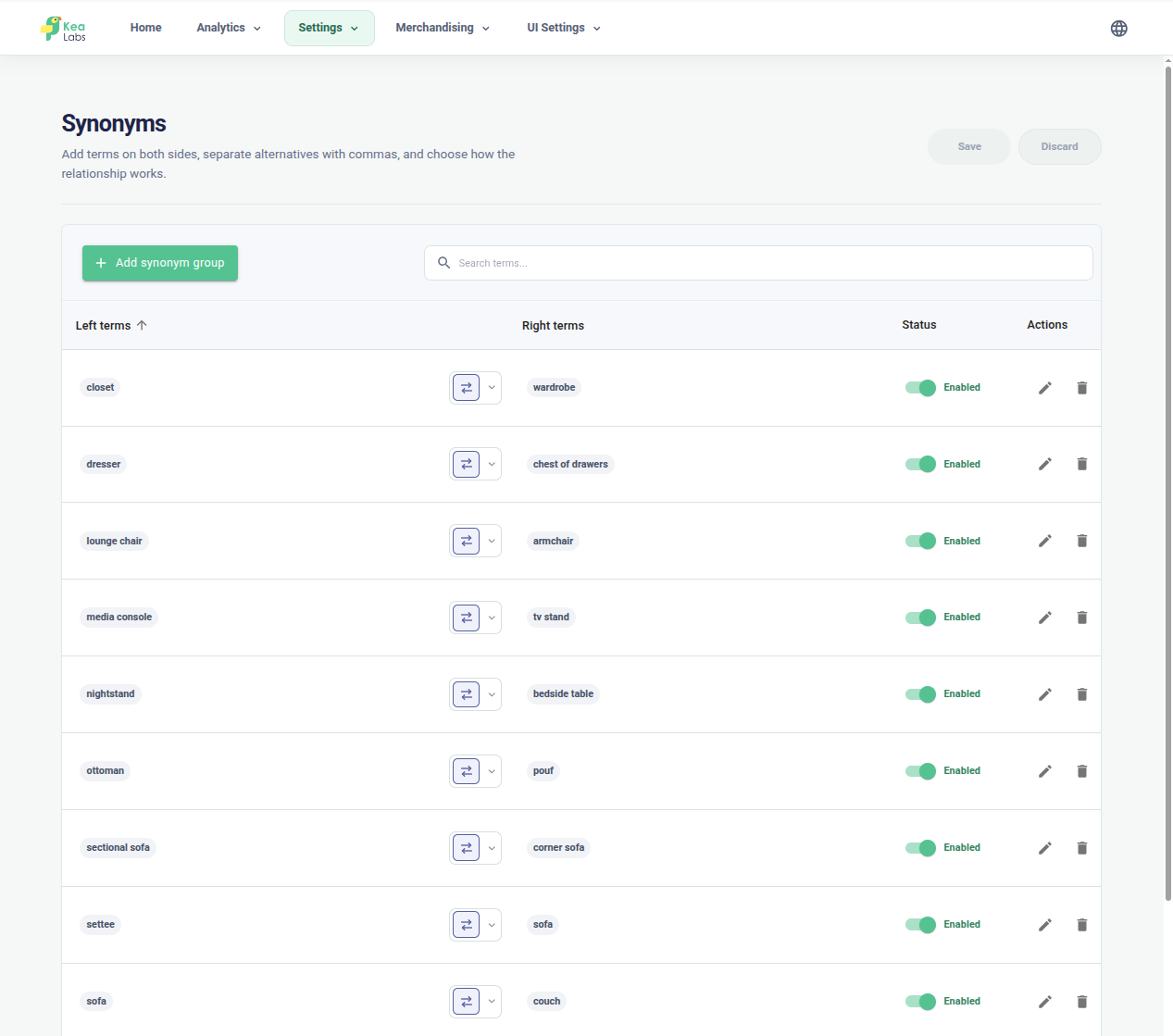
Connect shopper language to catalog terms
Review synonym groups and keep each connection meaningful for the products you sell.
Language processing
Match the words your shoppers use
Language-aware normalization helps equivalent text match before tokenization. Store-specific synonyms connect the vocabulary shoppers use with the product terms your catalog maintains.
- Match supported plain and accented forms, such as “cafe” and “café”.
- Normalize accented and special characters across supported European languages.
- Connect equivalent catalog and customer terms with synonym groups.
- Review exact product names, detailed queries, and references together.

Ranking stack
Add product priorities to a relevant result
Every query passes through distinct layers, so commercial priorities can shape good results without replacing the search engine underneath.
Foundation
Relevance ranking
BM25 relevance scoring, weighted fields, analyzers, synonyms, and typo tolerance find and order relevant products.
Product context
Product rules
Availability, category context, and other product conditions adjust the ranked result set.
Business control
Search merchandising
Pin, boost, bury, or hide products for important queries while the relevance engine continues to find the right products.
Merchandising changes business priority. It does not replace the engine that finds relevant products.
WooCommerce search relevance FAQ
Does Kea Labs Search Pro use WooCommerce keyword matching alone?
No. Kea Labs Search Pro provides its own SQL-backed relevance engine with BM25 scoring, configurable field priorities, text analysis, synonyms, typo tolerance, and fuzzy matching. Compare Kea Labs Search Pro with your current search.
Can shoppers search by SKU or product attributes?
Kea Labs Search Pro can use references and supported product attributes when those values are available and included in the searchable catalog data. Validate the exact fields and variation data used by your WooCommerce store.
Is AI-assisted setup the same as semantic search?
No. AI assistance helps configure and review Kea Labs Search Pro. Its shopper-facing relevance engine is based on indexed catalog data and configurable ranking; semantic search is a separate product requirement.